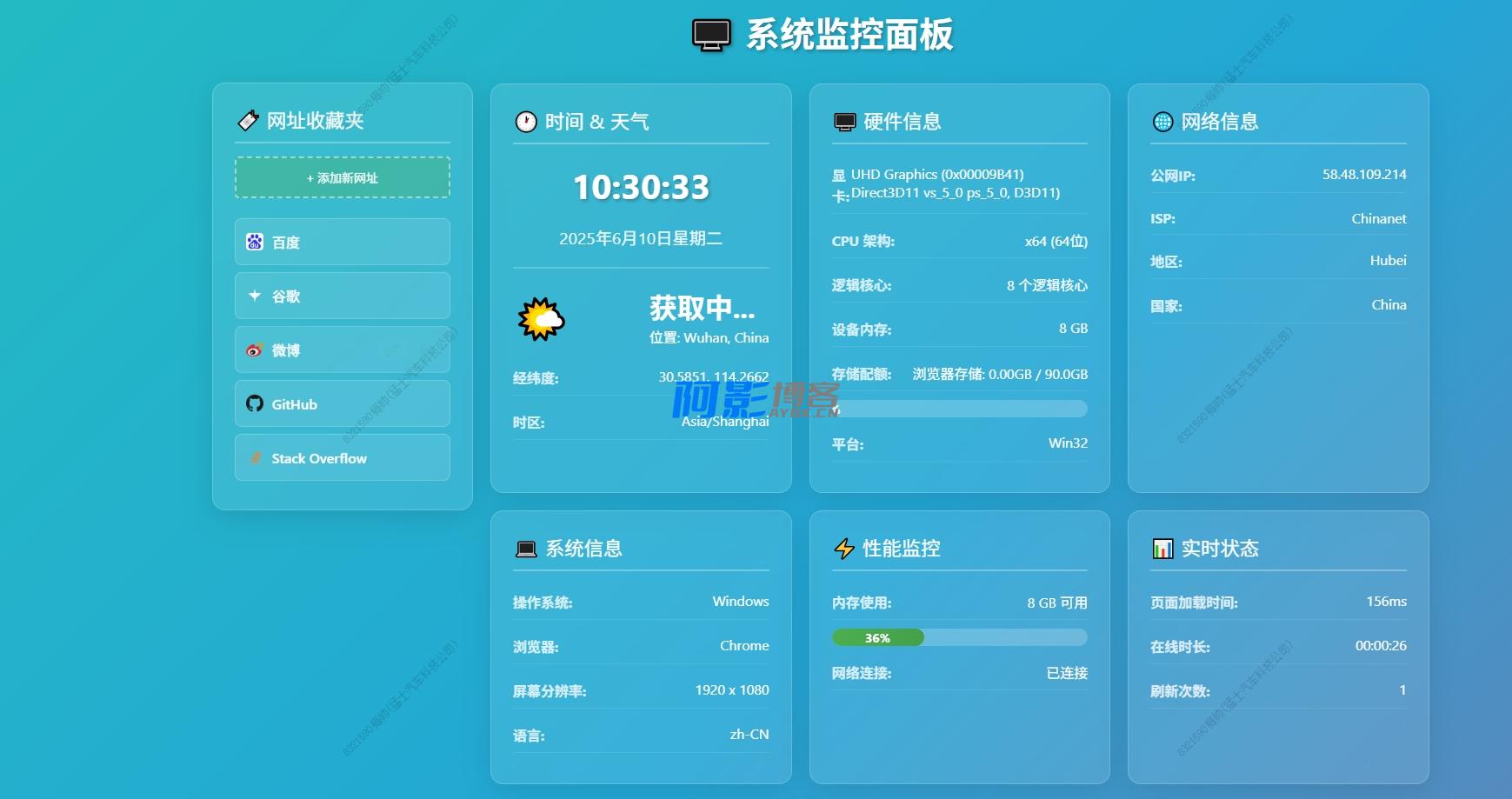
基于 Web 的实时系统监控面板,提供系统信息查看、网址收藏管理等功能。界面采用现代化设计,支持响应式布局。(练习版本)
完整源码开放测试结束,若有亟需可PM
V1:单色背景,下载后双击,浏览器打开即可
V2:[ 渐进色背景,下载后双击,浏览器打开即可
硬件信息获取:
async function getHardwareInfo() {
    try {
        // 获取显卡信息
        let gpuInfo = '未知';
        try {
            const canvas = document.createElement('canvas');
            const gl = canvas.getContext('webgl') || canvas.getContext('experimental-webgl');

            if (gl) {
                const renderer = gl.getParameter(gl.RENDERER);
                const vendor = gl.getParameter(gl.VENDOR);

                // 尝试获取更详细的显卡信息
                const debugInfo = gl.getExtension('WEBGL_debug_renderer_info');
                if (debugInfo) {
                    const unmaskedRenderer = gl.getParameter(debugInfo.UNMASKED_RENDERER_WEBGL);
                    if (unmaskedRenderer && unmaskedRenderer !== 'WebKit WebGL') {
                        gpuInfo = unmaskedRenderer;
                    } else {
                        gpuInfo = renderer || '集成显卡';
                    }
                } else {
                    gpuInfo = renderer || '集成显卡';
                }

                // 清理显卡名称
                if (gpuInfo.includes('ANGLE')) {
                    gpuInfo = gpuInfo.replace(/ANGLE \([^)]*\)/, '').trim();
                }
            }
        } catch (e) {
            gpuInfo = '检测失败';
        }
        document.getElementById('gpuInfo').textContent = gpuInfo;

        // CPU架构和核心数
        const cores = navigator.hardwareConcurrency || 0;
        let cpuArch = '未知架构';

        // 检测CPU架构
        const ua = navigator.userAgent.toLowerCase();
        const platform = (navigator.platform || '').toLowerCase();

        if (platform.includes('win64') || platform.includes('x64') || ua.includes('x64')) {
            cpuArch = 'x64 (64位)';
        } else if (platform.includes('win32') || platform.includes('x86') || ua.includes('x86')) {
            cpuArch = 'x86 (32位)';
        } else if (platform.includes('arm') || ua.includes('arm')) {
            cpuArch = 'ARM 架构';
        } else if (ua.includes('aarch64')) {
            cpuArch = 'ARM64 架构';
        } else if (platform.includes('mac')) {
            cpuArch = ua.includes('intel') ? 'Intel x64' : 'Apple Silicon';
        }

        document.getElementById('cpuModel').textContent = cpuArch;
        document.getElementById('cpuCores').textContent = cores > 0 ? `${cores} 个逻辑核心` : '无法检测';

        // 内存信息
        const memory = navigator.deviceMemory;
        if (memory) {
            document.getElementById('memoryCapacity').textContent = `${memory} GB`;
        } else {
            document.getElementById('memoryCapacity').textContent = '无法检测';
        }

        // 浏览器存储配额
        if ('storage' in navigator && 'estimate' in navigator.storage) {
            try {
                const estimate = await navigator.storage.estimate();
                const quota = estimate.quota || 0;
                const usage = estimate.usage || 0;

                if (quota > 0) {
                    const quotaGB = (quota / (1024 * 1024 * 1024)).toFixed(1);
                    const usageGB = (usage / (1024 * 1024 * 1024)).toFixed(2);
                    const usagePercent = Math.round((usage / quota) * 100);

                    document.getElementById('storageInfo').textContent =
                        `浏览器存储: ${usageGB}GB / ${quotaGB}GB`;
                    document.getElementById('storageProgress').style.width = `${usagePercent}%`;
                    document.getElementById('storageProgress').textContent = `${usagePercent}%`;
                } else {
                    document.getElementById('storageInfo').textContent = '存储信息不可用';
                    document.getElementById('storageProgress').style.width = '0%';
                    document.getElementById('storageProgress').textContent = '0%';
                }
            } catch (e) {
                document.getElementById('storageInfo').textContent = '存储检测失败';
            }
        } else {
            document.getElementById('storageInfo').textContent = '不支持存储API';
        }

        // 平台信息
        const platformInfo = navigator.platform || navigator.userAgentData?.platform || '未知平台';
        document.getElementById('platformInfo').textContent = platformInfo;

    } catch (error) {
        console.error('获取硬件信息失败:', error);
        // 设置默认值
        document.getElementById('gpuInfo').textContent = '检测失败';
        document.getElementById('cpuModel').textContent = '检测失败';
        document.getElementById('cpuCores').textContent = '检测失败';
        document.getElementById('memoryCapacity').textContent = '检测失败';
        document.getElementById('storageInfo').textContent = '检测失败';
        document.getElementById('platformInfo').textContent = '检测失败';
    }
}免费声明
- 本网站的文章内容可能来源于网络,仅供大家学习与参考,如有侵权,请联系站长QQ:304906607进行删除处理。
- 文章采用: 《署名-非商业性使用-相同方式共享 4.0 国际 (CC BY-NC-SA 4.0)。
- 本站资源大多存储在云盘,如发现链接失效,请联系我们我们会第一时间更新。
- 本站一切资源不代表本站立场,并不代表本站赞同其观点和对其真实性负责。
- 本站一律禁止以任何方式发布或转载任何违法的相关信息,访客发现请向站长举报
- 本站永久网址:https://www.aybk.cn

DS生成的代码-考场监考人员抽签系统
« 上一篇
07-04
一个简单网页预约会议室系统
下一篇 »
07-04





发表评论
请先登录后才能发表评论